
Client Portal logs and debugging
This document outlines the logging features of the MedicarePro ClientPortal, detailing how to view logs of user interactions and troubleshoot login issues.
ClientPortal Logging
MedicarePro CRM logs all interactions that individuals have within their ClientPortal, including all login attempts. This feature is essential for maintaining security and providing support to users.
Viewing Logs
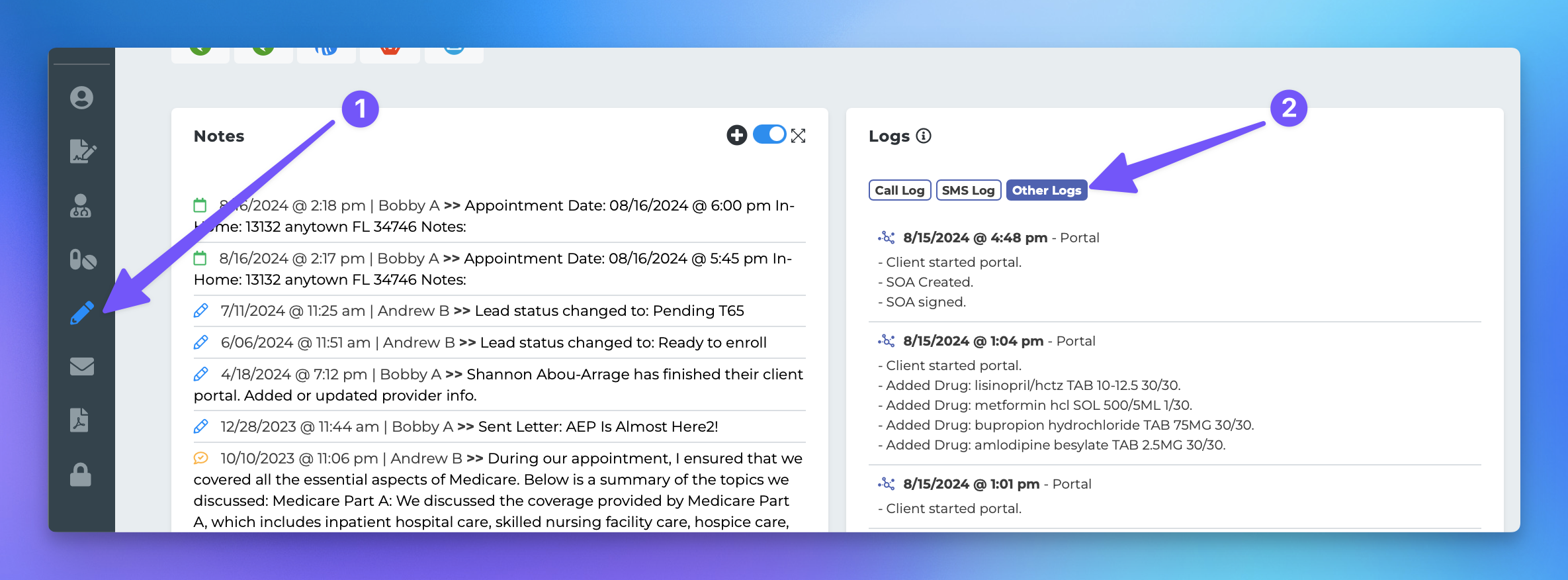
If you need to validate the interactions an individual had while using their portal, please follow these steps:
Navigate to the individual's profile page.
Click the "Notes & Logs" icon on the left-hand side.
Select "Other logs" from the logs section.
Debugging Failed Logins
If an individual has reported difficulties logging into their ClientPortal, you can easily check the password they are using to assist them effectively. To do this, follow these steps:
Navigate to the individual's profile page.
Click the "Notes & Logs" icon on the left-hand side.
Select "Other logs."
You will see the log item: "FAILED portal login using password: xxxxx."