
History and Audit Trail
Purpose
The History tab answers two questions: which files have I already reconciled, and what did I change as a result?
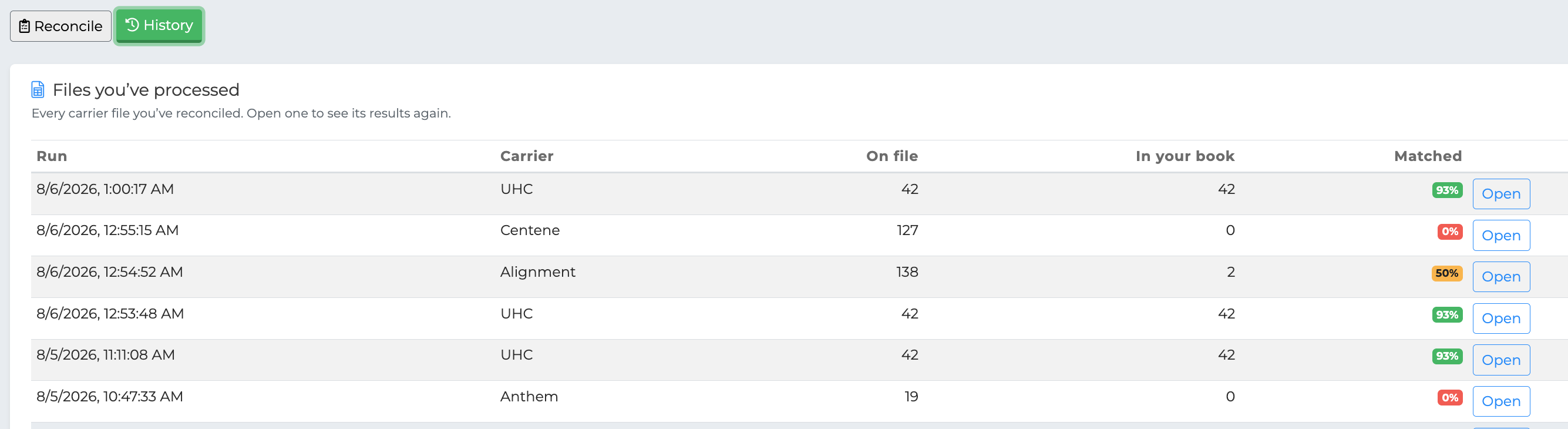
Files you've processed
Every reconciliation you've run, newest first, showing:
When it was run
Which carrier the file was for
How many people were on the file
How many policies you held with that carrier at the time
What percentage matched, colore-coded the same way as the results screen
Open reloads that reconciliation's results, so you can pick up where you left off or re-check a decision without uploading the file again.
This is also how you tell whether a carrier is due. If your last Aetna reconciliation was eight months ago, it's probably worth another.
Changes you've made
Every policy and client changed through reconciliation, newest first:
When the change was made
What was done — cancelled, marked replaced, set inactive, set deceased, flagged, dismissed or undone
Which client, with their carrier and policy number
The change itself, for example
Policy Active → Canceled
This record is never rewritten
Each action is recorded as it happens, and nothing edits those entries afterwards. Undoing a change doesn't erase it — the undo is recorded as its own entry, so the sequence reads as what actually happened rather than only where things ended up.
That matters if you ever need to answer "who cancelled this policy, and when?" months later. It also means deleting a reconciliation doesn't remove the record of policies it changed — those changes outlive the run that produced them.
Changes made here also appear in the CRM's own activity log, alongside the same changes made from a client's profile.
Undoing a change
Find the change in the list and undo it. The policy and client are restored to exactly the state recorded before the action — including clearing a termination date that wasn't there before.
The undo is then added to the history as its own entry.
Paging
Both lists show 25 at a time, with the total alongside — for example Showing 1–25 of 80 runs. Use Previous and Next to move through them.